Distributed Training of a Deep Recommender System
Designing a recommender system is not a trivial problem to solve and big tech companies have invested hundreds of millions into building the best recommender systems platform. While I will not go through the details of designing a full recommender system in this post and I would like to keep that for a future post. In this post I would be walking through the steps I followed to train a deep recommender system (a recommender system implemented using deep neural networks) in a distributed environment i.e. where we have a cluster of nodes/pods each with a limited memory and limited number of CPUs/GPUs.
Note that this was a weekly side project that I felt would be fun to do. Many of the codes or design that are shown here may not be fully optimized for production. Athough I will try to point out scopes for improvements wherever possible to the best of my knowledge. Also, I leveraged some of my team’s reserved and not in use GPU pods to run the model so to keep the post short I will not go through the setup of the distributed environment such as provisioning nodes in GCP or writing kebernetes YAML to spin up multiple GPU pods etc.
For anyone interested in deploying a distributed trainer in production, look at Ray. The biggest pro I found in using Ray for distributed training is that it can autoscale and has fault tolerance inbuilt.
The dataset used for training the deep recommender system in this post is MovieLens-32M (~32 million movie ratings).
The dataset comprises of multiple files corresponding to ratings (user id, movie id, rating, timestamp), movies metadata such as title, genre etc. and movie tags. I will be using all of these data as features to train a regression model to predict the rating given the user and movie input features along with any other features. To be more precise I am going to use the following features for the model.
User Features
1. user_id
2. previously rated N movie_ids
3. previous N movie ratings

Movie Features
1. movie_id
2. genres
3. description + tags metadata
4. year of release

Ratings - Normalized Rating corresponding to user_id and movie_id
Data Generation

Step 1
The 1st step would be to read the dataset files. Since the original dataset size is approximately 1 GB, I can comfortably read the dataset into Pandas dataframes and do the processing on top of pandas. Although it is highly recommended to use either Spark to read and process the dataset on low memory systems or use Polars instead of Pandas due to Polars being significantly faster than Pandas for data processing. I wrote this simple Python function to read the dataset into dataframes as follows:
def get_ml_32m_dataframe(path:str):
    """
    Read dataset file and create pandas dataframes
    """
    ratings_path = os.path.join(path, 'ratings.csv')
    movies_path = os.path.join(path, 'movies.csv')
    tags_path = os.path.join(path, 'tags.csv')

    rating_column_names = ['userId', 'movieId', 'rating', 'timestamp']
    movies_column_names = ['movieId', 'title', 'genres']
    tags_column_names   = ['userId', 'movieId', 'tag', 'timestamp']

    df_ratings = \
        pd.read_csv(
            ratings_path,
            sep=',',
            names=rating_column_names,
            dtype={
                'userId':'int32',
                'movieId':'int32',
                'rating':float,
                'timestamp':'int64'
            },
            header=0
        )

    df_movies = \
        pd.read_csv(
            movies_path,
            sep=',',
            names=movies_column_names,
            dtype={
                'movieId':'int32',
                'title':'object',
                'genres':'object'
            },
            header=0)

    df_tags = \
        pd.read_csv(
            tags_path,
            sep=',',
            names=tags_column_names,
            dtype={
                'userId':'int32',
                'movieId':'int32',
                'tag':'object',
                'timestamp':'int64'
            },
            header=0
        )

    df_ratings.dropna(inplace=True, subset=['userId', 'movieId', 'rating'])
    df_movies.dropna(inplace=True, subset=['movieId', 'title', 'genres'])
    df_tags.dropna(inplace=True, subset=['userId', 'movieId', 'tag'])
    df_tags.drop(columns=["userId","timestamp"], inplace=True)

    # Extract movie genres
    df_movies['genres'] = df_movies['genres'].apply(lambda x: x.lower().split('|'))

    # Extract movie year
    df_movies['movie_year'] = \
        df_movies['title'].str.extract(r'\((\d{4})\)').fillna("2025").astype('int')

    # Extract movie title, replace non alpha-numeric characters with blanks,
    # lowercase and remove stopwords

    df_movies['title'] = df_movies['title'].str.replace(r'\((\d{4})\)', '', regex=True)
    df_movies['title'] = df_movies['title'].str.replace(r'[^a-zA-Z0-9\s]+', '', regex=True)
    df_movies['title'] = df_movies['title'].apply(lambda x: x.strip().lower().split(" "))
    df_movies['title'] = df_movies['title'].apply(lambda x: remove_stop(x))

    # Extract movie tags, replace non alpha-numeric characters with blanks,
    # lowercase and remove stopwords. Group tags per movie.

    df_tags['tag'] = df_tags['tag'].str.replace(r'[^a-zA-Z0-9\s]+', '', regex=True)
    df_tags['tag'] = df_tags['tag'].apply(lambda x: x.strip().lower())
    df_tags = df_tags.groupby("movieId").agg(set).reset_index()
    df_tags['tag'] = df_tags['tag'].apply(list)
    df_tags['tag'] = df_tags['tag'].apply(lambda x: flatten_lists(x))
    df_tags['tag'] = df_tags['tag'].apply(lambda x: remove_stop(x))
    df_tags['tag'] = df_tags['tag'].astype("object")

    df_movies = df_movies.merge(df_tags, on=['movieId'], how='left')
    df_movies["tag"] = df_movies["tag"].fillna({i: [""] for i in df_movies.index})
    df_movies["description"] = df_movies["title"] + df_movies["tag"]
    df_movies.drop(columns=["tag"], inplace=True)
    df_movies.drop(columns=["title"], inplace=True)

    return df_ratings, df_movies

print("Reading datasets from path...")
df_ratings, df_movies = get_ml_32m_dataframe(dataset_path)
The above function uses certain UDFs to preprocess data. The columns I am interested in are : [user_id, movie_id, rating, timestamp, description, genres, movie_year].
The column description is a derived column from title and tags. I am assuming a 1-gram language model and extracting the words as tokens. Instead of a 1-gram model, one can use a n-gram model. The entire code can be found here.
Step 2
Normalize the ratings - Normalize each rating in N(0, 1) by the mean and standard deviation of all ratings given by the user id because each user has their own preference and rating standard thus it does not make sense to normalize using all the users. One can also build a model with the mean and standard deviation as learnable parameters using the negative log likelihood of normal distribution as the loss function. It would usually make more sense to do that.
def normalize_ratings(df:pd.DataFrame):
    """
    Normalize ratings
    """
    df2 = \
        df[["userId", "rating"]]\
            .groupby(by=["userId"])\
            .agg(
                mean_user_rating=('rating', 'mean'),
                std_user_rating=('rating', 'std')
            )
    df = df.merge(df2, on=["userId"], how="inner")
    df["normalized_rating"] = (df["rating"] - df["mean_user_rating"])/df["std_user_rating"]
    df["normalized_rating"] = df["normalized_rating"].fillna(df["rating"])
    df.drop(columns=["rating"], inplace=True)
    return df
Step 3
Split the dataset of ratings into train, test and validation. I choose to do a time based split by first sorting on timestamp. In this way I can ensure that historical features such as previously rated movies and ratings do not leak from training into testing or validation. I chose to use 80% of the ratings for training and 20% for testing. Out of 80% in training 20% is used for validation after each epoch of training. The movies metadata dataset is not splitted as it is used to join with the ratings dataset in train, test and validation.
def split_train_test(
    df:pd.DataFrame,
    min_rated=10,
    test_ratio=0.8,
    val_ratio=0.8
):
    """
    Split dataset into train, test and validation
    """
    print("Splitting data into train test and validation...")
    # Split data into training, testing and validation
    df = df.sort_values(by='timestamp')
    df2 = df[["userId", "movieId"]].groupby(by=["userId"]).agg(list).reset_index()

    # Filter all user_ids who have rated more than 'min_rated' movies
    df2 = df2[df2.movieId.apply(len) > min_rated]
    df = df.merge(df2, on=["userId"], how="inner", suffixes=("", "_right"))
    df.drop(columns=['movieId_right'], inplace=True)

    n = df.shape[0]
    m = int(test_ratio*n)

    df_train_val = df[:m]
    df_test = df[m:]

    k = int(val_ratio*m)
    df_train = df_train_val[:k]
    df_val = df_train_val[k:]

    return df_train, df_val, df_test
Before splitting, I am filtering ratings data by users who have given at-least min-rated number of ratings so as to reduce noise in the training dataset due to long tail users with 1 or 2 ratings only. Usually one can set min_ratings as 10 or 20.
Step 4
Compute the vocabularies for the categorical features only on the training data. Apply the learnt vocabularies on the validation and testing datasets.
def fit_vocabulary(df_ratings:pd.DataFrame, df_movies:pd.DataFrame):
    """
    Fit vocabulary
    """
    vocabulary = {}
    max_vocab_size = {'userId':1e100, 'movieId':1e100, 'description':1e5, 'genres':100, 'movie_year':1e100}

    for col in ['userId', 'movieId']:
        print(col)
        df_ratings[col], v = categorical_encoding(df_ratings, col, max_vocab_size[col])
        vocabulary[col] = v

    for col in ['description', 'genres', 'movie_year']:
        print(col)
        df_movies[col], v = categorical_encoding(df_movies, col, max_vocab_size[col])
        vocabulary[col] = v

    for col in ['movieId']:
        print(col)
        df_movies[col] = df_movies[col].apply(lambda x: transform(x, vocabulary[col]))

    return vocabulary, df_ratings, df_movies

def score_vocabulary(df_ratings:pd.DataFrame, vocabulary:dict):
    """
    Score vocabulary
    """
    df_ratings = df_ratings.reset_index()
    for col in ['userId', 'movieId']:
        print(col)
        df_ratings[col] = df_ratings[col].apply(lambda x: transform(x, vocabulary[col]))

    return df_ratings
To limit the vocabulary size, I am using a frequency based criteria wherein I keep the top N values per feature based on frequency of occurrence. This is useful for categorical features with millions or billions of categories such as language models. Frequency based filtering may not be optimal because many times a low frequency value could be a better feature than another high frequency value. A better strategy could be to use TF-IDF scores. Again the entire code for vocabulary fitting and scoring can be found here.
Step 5
Compute the historical user features such as the previously rated N movies and previous N ratings each for training, testing and validation datasets separately. With pandas, computing the historical features becomes too much time consuming task so I wrote the Cython modules for the same which improved the run time from 1 hour to only 1.5 mins.
The C++/Cython module for the ml_32m_py.py_get_historical_features can be found in github here.
In order to build the Cython module, follow the steps shown below:
pip install --upgrade Cython
python setup_ml_32m_gcp.py bdist_wheel
pip install --force-reinstall dist/*.whl
Step 6
Convert the pandas dataframes into parquet files as parquet format is quite generic and efficient for column based feature datasets and if you are going to use spark in the future, you do not need to change the model dataloader. Save the parquet files in the GCS buckets in the cloud.
def save_dfs_parquet(
    out_dir:str,
    vocabulary:dict,
    df_ratings_train:pd.DataFrame,
    df_ratings_val:pd.DataFrame,
    df_ratings_test:pd.DataFrame,
    df_ratings_full:pd.DataFrame,
    df_movies:pd.DataFrame,
    num_partitions:int=32
):
    """
    Save dataframe into parquet files
    """
    # Partition the training data so as we can read only a subset of partitions
    # if required for debugging etc.

    df_ratings_train["partition"] = df_ratings_train.index % num_partitions
    df_ratings_val["partition"]   = df_ratings_val.index % num_partitions
    df_ratings_test["partition"]  = df_ratings_test.index % num_partitions
    df_ratings_full["partition"]  = df_ratings_full.index % num_partitions

    # shuffle the datasets so that user ids are randomly distributed across rows

    df_ratings_train = df_ratings_train.sample(frac=1).reset_index()
    df_ratings_val   = df_ratings_val.sample(frac=1).reset_index()
    df_ratings_test  = df_ratings_test.sample(frac=1).reset_index()
    df_ratings_full  = df_ratings_full.sample(frac=1).reset_index()

    if os.path.exists(out_dir):
        try:
            shutil.rmtree(out_dir)
        except:
            pass

    os.makedirs(out_dir, exist_ok=True)
    joblib.dump(vocabulary, f"{out_dir}/vocabulary.pkl")
    df_ratings_train.to_parquet(out_dir + "/train/", partition_cols=["partition"])
    df_ratings_val.to_parquet(out_dir + "/validation/", partition_cols=["partition"])
    df_ratings_test.to_parquet(out_dir + "/test/", partition_cols=["partition"])
    df_ratings_full.to_parquet(out_dir + "/full_data/", partition_cols=["partition"])
    df_movies.to_parquet(out_dir + "/movies.parquet")
The parquet dataset is partitioned randomly into 32 partitions so that during training, multiple GPU workers can access only a subset of the partitions and train the model on that subset of data instead of working with the full dataset. Later we will see that using 8 GPU workers, each GPU worker accesses roughly 4 partitions thus enabling parallelization.
Model Architecture
As mentioned earlier that I am solving this recommender system problem as a regression over the normalized ratings. Regression is not the only way to solve. One can also solve this as a binary classification problem by turning ratings and views into binary labels. For e.g. with normalized ratings, one can assign a label of 1 to all ratings >= 0 and a label of 0 to all ratings < 0 since normalized ratings has a mean of 0. There are few challenges I saw when implementing a binary classification approach to a recommender system:
Challenge 1
Defining positive and negative examples correctly. One strategy is as mentioned above where we consider all ratings above the mean for that user as positives and rest as negatives. But this is only possible where explicit ratings are available.
Challenge 2
Even with explicit ratings available, should I consider the unrated movies as negatives too because the user might have chose to ignore watching them or worse decided to not rate them at all.
Challenge 3
If ratings are missing, one way to implicitly label is to assign 1 to watched movies and 0 to not watched movies. But this could lead to severe class imbalance issues as number of unwatched movies far exceeds watched movies.
Challenge 4
Assigning 0 or negative to unwatched movies could lead to bias in training data because if someone has not watched a movie and you train them as negatives, the model will learn to rank them and similar movies lower thus reducing the diversity in recommendations.
Movie Features
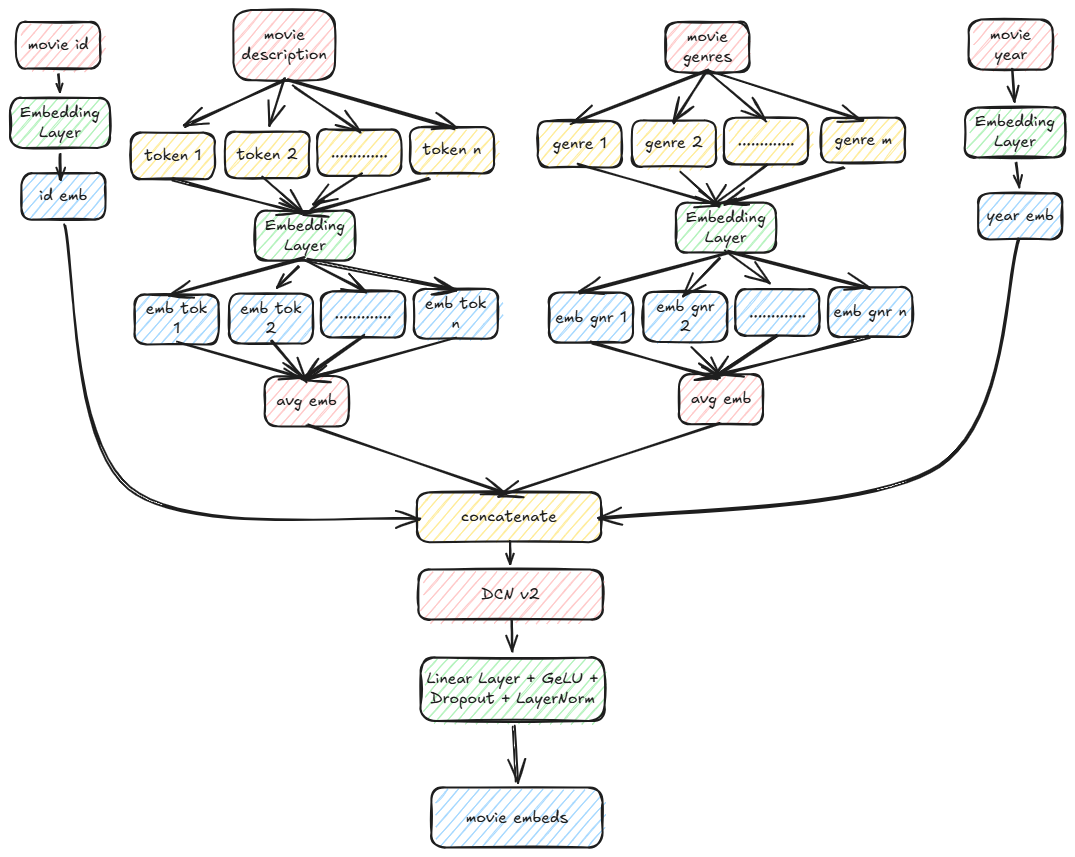
DCN v2 is a cross feature layer to enable feature-feature interactions. Here is a snippet of the code for computing the movie embeddings as shown above:
class MovieEncoder(nn.Module):
    def __init__(
            self,
            movie_id_size,
            movie_desc_size,
            movie_genres_size,
            movie_year_size,
            embedding_size,
            dropout=0.0
        ) -> None:

        super(MovieEncoder, self).__init__()

        self.movie_id_emb = MovieId(movie_id_size, embedding_size)
        self.movie_desc_emb = nn.Embedding(movie_desc_size, 256, padding_idx=0)
        self.movie_genres_emb = nn.Embedding(movie_genres_size, 8, padding_idx=0)
        self.movie_year_emb = nn.Embedding(movie_year_size, 16, padding_idx=0)

        self.fc_concat = nn.Linear(embedding_size + 280, embedding_size)
        init_weights(self.fc_concat)

        self.fc = nn.Sequential(
            self.fc_concat,
            nn.GELU(),
            nn.Dropout(dropout),
            nn.LayerNorm(embedding_size)
        )

        self.cross_features = CrossFeatureLayer(embedding_size + 280, 3, 0.0)

    def forward(
            self,
            ids:torch.Tensor,
            descriptions:torch.Tensor,
            genres:torch.Tensor,
            years:torch.Tensor
        ):

        id_emb = self.movie_id_emb(ids) # (batch, embedding_size)
        desc_emb = emb_averaging(descriptions, self.movie_desc_emb) # (batch, 256)
        genres_emb = emb_averaging(genres, self.movie_genres_emb) # (batch, 8)
        years_emb = self.movie_year_emb(years) # (batch, 16)

        movie_embedding = torch.concat([id_emb, desc_emb, genres_emb, years_emb], dim=-1) # (batch, embedding_size + 280)
        movie_embedding = self.cross_features(movie_embedding) + movie_embedding # (batch, embedding_size + 280)
        movie_embedding = self.fc(movie_embedding) # (batch, embedding_size)

        return movie_embedding
The full code with all the components can be found at the github repo.
Complete Model
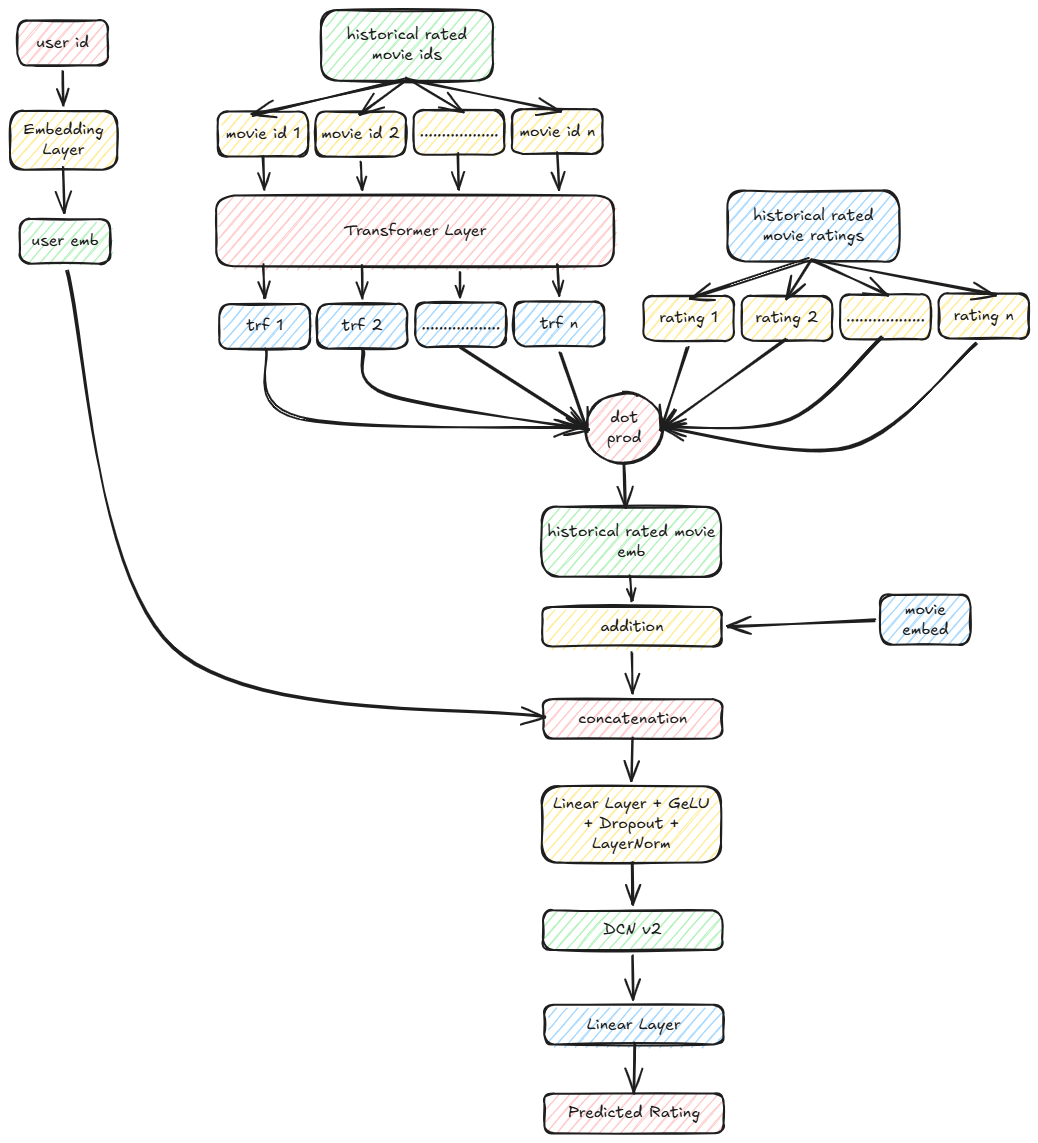
Recommender system class definition:
class RecommenderSystem(nn.Module):
    def __init__(
            self,
            user_id_size,
            user_embedding_size,
            user_prev_rated_seq_len,
            user_num_encoder_layers,
            user_num_heads,
            user_dim_ff,
            user_dropout,
            movie_id_size,
            movie_desc_size,
            movie_genres_size,
            movie_year_size,
            movie_embedding_size,
            movie_dropout,
            embedding_size,
            dropout=0.0
        ) -> None:

        super(RecommenderSystem, self).__init__()

        self.user_embedding_size = user_embedding_size
        self.movie_embedding_size = movie_embedding_size

        self.movie_encoder = \
            MovieEncoder\
            (
                movie_id_size,
                movie_desc_size,
                movie_genres_size,
                movie_year_size,
                movie_embedding_size,
                movie_dropout
            )

        self.user_encoder = \
            UserEncoder\
            (
                user_id_size,
                user_embedding_size
            )

        self.movie_id_emb = self.movie_encoder.movie_id_emb

        self.user_prev_positional_encoding = \
            PositionalEncoding(
                movie_embedding_size,
                user_prev_rated_seq_len,
                user_dropout
            )

        self.user_prev_encoder_block = \
            Encoder(
                user_num_encoder_layers,
                movie_embedding_size,
                user_num_heads,
                user_dim_ff,
                user_dropout
            )

        self.user_prev_num_heads = user_num_heads

        self.fc_concat = nn.Linear(user_embedding_size + movie_embedding_size, embedding_size)
        init_weights(self.fc_concat)

        self.fc = nn.Sequential(
            self.fc_concat,
            nn.GELU(),
            nn.Dropout(dropout),
            nn.LayerNorm(embedding_size)
        )

        self.cross_features = CrossFeatureLayer(embedding_size, 3, 0.0)

        self.fc_out = nn.Linear(embedding_size, 1)
        init_weights(self.fc_out)

        self.out = nn.Sequential(
            self.fc_out
        )

    def get_movie_embeddings(
            self,
            movie_ids:torch.Tensor, # (batch,)
            movie_descriptions:torch.Tensor, # (batch, ntokens)
            movie_genres:torch.Tensor, # (batch, ntokens)
            movie_years:torch.Tensor # (batch,))
    ):

        return \
            self.movie_encoder\
                (
                    movie_ids,
                    movie_descriptions,
                    movie_genres,
                    movie_years
                )

    def get_user_embeddings(
            self,
            user_ids:torch.Tensor # (batch,)
    ):

        return \
            self.user_encoder\
                (
                    user_ids
                )

    def forward(
            self,
            user_ids:torch.Tensor, # (batch,)
            user_prev_rated_movie_ids:torch.Tensor, # (batch, seq)
            user_prev_ratings:torch.Tensor, # (batch, seq)
            movie_ids:torch.Tensor, # (batch,)
            movie_descriptions:torch.Tensor, # (batch, ntokens)
            movie_genres:torch.Tensor, # (batch, ntokens)
            movie_years:torch.Tensor # (batch,)
        ):

        movie_embeddings = \
            self.get_movie_embeddings\
                (
                    movie_ids,
                    movie_descriptions,
                    movie_genres,
                    movie_years
                )                                  # (batch, movie_embedding_size)

        user_embeddings = \
            self.get_user_embeddings\
                (
                    user_ids
                )                               # (batch, user_embedding_size)

        # mask the paddings from attention
        mask = (user_prev_rated_movie_ids != 0).float().unsqueeze(-1) # (batch, prev_rated_seq_len, 1)
        mask = torch.matmul(mask, mask.transpose(-2,-1)).unsqueeze(1).repeat(1, self.user_prev_num_heads, 1, 1) # (batch, num_heads, prev_rated_seq_len, prev_rated_seq_len)

        rated_movie_emb = self.movie_id_emb(user_prev_rated_movie_ids)   # (batch, prev_rated_seq_len, movie_embedding_size)
        rated_movie_emb = self.user_prev_positional_encoding(rated_movie_emb) # (batch, prev_rated_seq_len, movie_embedding_size)
        rated_movie_emb = self.user_prev_encoder_block(rated_movie_emb, mask) # (batch, prev_rated_seq_len, movie_embedding_size)

        rated_movie_ratings = user_prev_ratings.unsqueeze(1) # (batch, 1, prev_rated_seq_len)
        # weighted sum of ratings
        rated_movie_emb_weighted = torch.matmul(rated_movie_ratings, rated_movie_emb).squeeze(1) # (batch, movie_embedding_size)

        movie_embeddings = movie_embeddings + rated_movie_emb_weighted # (batch, movie_embedding_size)

        emb_concat = torch.concat([movie_embeddings, user_embeddings], dim=-1) # (batch, movie_embedding_size + user_embedding_size)

        emb  = self.fc_concat(emb_concat) # (batch, embedding_size)
        emb  = self.cross_features(emb) + emb  # (batch, embedding_size)
        out  = self.out(emb).squeeze(-1)  # (batch,)

        return out
Trainer
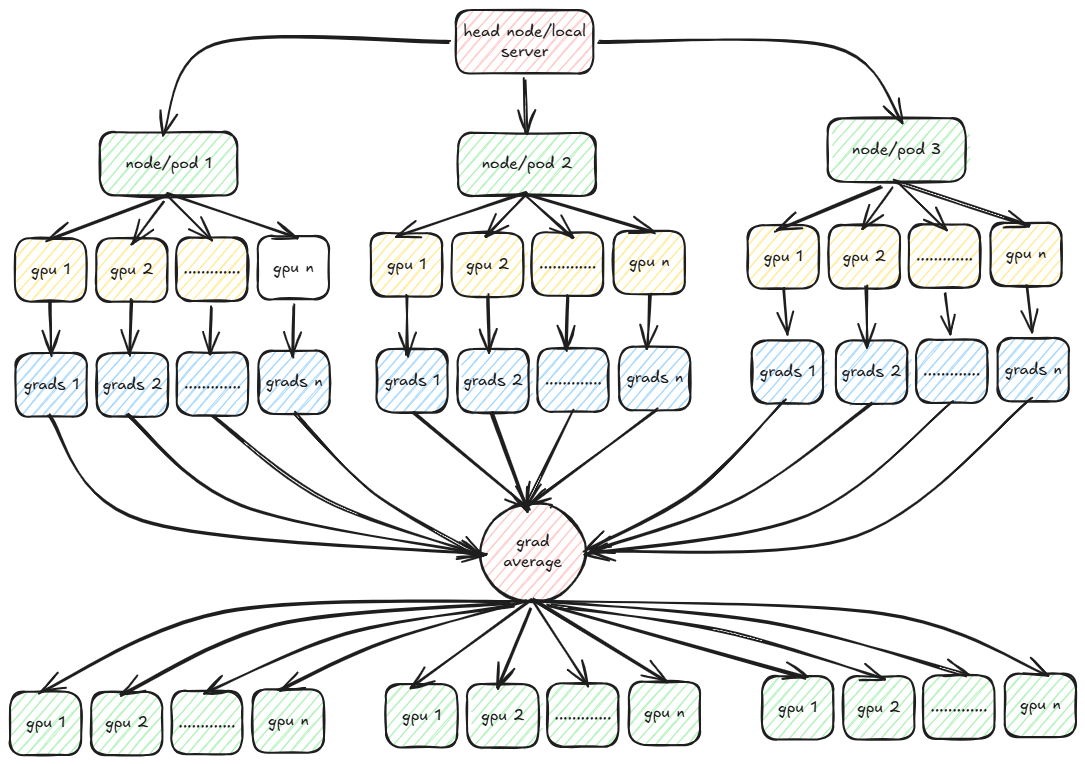
Finally we come to the trainer part wherein we will explore distributed training using PyTorch. PyTorch provides multiple strategies for distributed training. The two most popular are DDP (Distributed Data Parallel) and FSDP (Fully Sharded Data Parallel). In both DDP and FSDP, the training data is partitioned across multiple workers across multiple nodes with each worker working with only its data to compute the loss during forward passes and compute gradients in backward passes.
The gradients are then averaged and broadcasted to all workers so that each worker now sees the same gradient values. In FSDP, the model is also partitioned across the workers. This is the case where the size of model is too large to fit in the memory of a single node or worker. But in FSDP communication overhead increases as compared to DDP because each worker also needs to coordinate with other workers in the forward passes too.
In the example that I am working with, the model size is small enough to fit in the memory of a worker and thus I am going to use DDP. DDP uses multiple backend protocols for communication between workers such as MPI, Gloo and NCCL. For training on GPUs, almost always NCCL performs better than MPI or Gloo. We will deep dive each of these protocols and implement a custom MPI based distributed training in the next post.
PyTorch provides 2 important tools for running a trainer script across multiple workers and/or multiple nodes - torchrun and mpirun.
While torchrun is easy to work with as it does not require installing OpenMPI libraries or overhead of enabling ssh and tcp communication between the workers as in mpirun but in order to use torchrun, one needs to login to all the nodes/pods individually and run the script in each node individually. This might not be an ideal situation when we have to deploy the trainer in production and run the training jobs using a job scheduler such as Airflow. That is why I prefer to use mpirun instead of torchrun for this example.
In both torchrun and mpirun, environment variables are set for individual workers and nodes. The most important env variables in mpirun are the following:
OMPI_COMM_WORLD_SIZE - World size i.e. total number of workers across all nodes.
For e.g. if there are 2 nodes each with 8 GPU workers, then OMPI_COMM_WORLD_SIZE=16.
For torchrun it is WORLD_SIZE.

OMPI_COMM_WORLD_LOCAL_RANK - Local rank of a worker.
For e.g. if there are 2 nodes each with 8 GPU workers, then OMPI_COMM_WORLD_LOCAL_RANK ranges from 0-7 in node 0 and 0-7 in node 1.
For torchrun it is LOCAL_RANK.

OMPI_COMM_WORLD_RANK - Global rank of a worker.
For e.g. if there are 2 nodes each with 8 GPU workers, then OMPI_COMM_WORLD_RANK ranges from 0-7 in node 0 and 8-15 in node 1
For torchrun it is RANK.
In the example I am working with, I tweaked the DDP training strategy a bit. In vanilla DDP each worker initially has a view of all the training data and then at the start of each epoch, data is sharded across all the workers and nodes. Here I am tweaking this a bit so that each worker only downloads an equal sized shard from GCP bucket and works with only the same set of training data for all epochs. There are some advantages and disadvantages with this approach over vanilla DDP.
Advantage
The worker processes need not download the same metadata for the dataset. Each worker often reads the entire file index to sample its subset, leading to high disk I/O. When multiple processes (DDP ranks) try to read or index the same file simultaneously, it causes massive overhead, particularly with many small files.
Disadvantage
The vanilla DDP is useful when we have to shuffle the data after each epoch and thus in each epoch, each worker “sees” a different subset of data from the other epochs. Thus each worker gets the chance to train with all the training data. But with pre-sharding, each worker sees the same subset of data in all epochs. With large datasets this should not make a lot of difference if we pre-shuffle the data once before epoch 0.
Setup DDP
The first step is to initialize DDP before the start of training.
def ddp_setup(rank_local, rank_global, world_size):
    """
    Setup DDP
    """
    init_process_group(backend="nccl", world_size=world_size, rank=rank_global)
    torch.cuda.set_device(rank_local)

rank_local  = int(os.environ["OMPI_COMM_WORLD_LOCAL_RANK"]) if "OMPI_COMM_WORLD_LOCAL_RANK" in os.environ else int(os.environ["LOCAL_RANK"])
rank_global = int(os.environ["OMPI_COMM_WORLD_RANK"]) if "OMPI_COMM_WORLD_RANK" in os.environ else int(os.environ["RANK"])
world_size  = int(os.environ["OMPI_COMM_WORLD_SIZE"]) if "OMPI_COMM_WORLD_SIZE" in os.environ else int(os.environ["WORLD_SIZE"])

print("Setting up DDP...")
if dist.is_initialized() is False:
    ddp_setup(rank_local, rank_global, world_size)
Since I am using GPU to train thus the backed “nccl” is the preferred protocol.
Get Datasets
The next step is to for each worker GPU, download an “equal” sized shard from GCP. Note that during data generation, I partitioned the parquet dataset into 32 partitions. Thus if there are 8 GPU workers, each GPU downloads approximately 4 partitions of the parquet dataset.
Also note that if the total number of records across the 32 partitions is not divisible evenly by 32, then all partitions may not have the same number of records. This could potentially lead to uneven number of batches which could in turn lead to stalling of GPU which we will see later. For now assume that the dataset number of records is divisible by 32.
def get_dataset(path:str, cache_dir:str, world_size:int, rank:int, in_memory:bool=False, path_is_dir:bool=True):
    """
    Get dataset by prepartitioning files to each worker process
    """
    if path_is_dir:
        files = pre_partitions_for_download(path, world_size, rank)
    else:
        files = path

    os.makedirs(cache_dir, exist_ok=True)

    dataset = datasets.load_dataset("parquet", data_files=files, split="train", cache_dir=cache_dir, keep_in_memory=in_memory)
    return dataset


def get_datasets(path:str, world_size:int, rank:int):
    """
    Get train, validation and movies datasets
    """
    ratings_train = \
        get_dataset(
            f"{path}/train",
            f"/tmp/huggingface/{rank}/train",
            world_size,
            rank
        )
    ratings_train.set_format('pandas')

    ratings_val = \
        get_dataset(
            f"{path}/validation",
            f"/tmp/huggingface/{rank}/val",
            world_size,
            rank
        )
    ratings_val.set_format('pandas')

    movies_dataset = \
        get_dataset(
            f"{path}/movies.parquet",
            f"/tmp/huggingface/{rank}/movies",
            world_size,
            rank,
            in_memory=True,
            path_is_dir=False
        ).to_pandas()

    return ratings_train, ratings_val, movies_dataset

print("Getting datasets...")
ratings_train, ratings_val, movies_dataset = dataloader.get_datasets(datasets_gcs_path, world_size, rank_global)
I am using huggingface’s dataset package to download the parquet files from GCP. The dataset package downloads the parquet files from GCP and internally stores them in the arrow format on disk. In my case I am saving the files in the pandas format because for each batch, I need to join the batch of ratings with the movies dataset to get a single batch of training data.
You might ask as to why save the files in parquet if the original dataset was in pandas and for loading the batches we are using the pandas format. The reasoning is that the dataloader is agnostic of the data generator and is only concerned about the final files stored in GCP. Since parquet is more commonly used for large datasets, I prefer to store the files in parquet format only.
I am using cache_dir to cache the downloaded files which means that the next time I run the trainer, the files will be fetched from local disk instead of downloading from GCP.
Note that before download, I select the indices of the files to download based on the local rank of the worker and the world size. The current worker downloads all files with file indices where index % world size = local_rank. In this way each worker gets an almost equal share of files.
The movies dataset in held in memory whereas the ratings datasets are memory mapped on disk.
Another disadvantage of using a custom sharding with DDP training is that each worker now probably has to deal with different number of batches per epoch. If we have different number of batches per epoch, then the worker that finishes first with all its batches, will exit after broadcasting its gradients for its last batch whereas the workers with more number of batches will wait for all the workers to broadcast its gradients for averaging for the additional batches. But since one or more number of batches have exited, the worker with more number of batches will wait indefinitely causing NCCL timeouts.
One solution to this problem is to assign equal number of batches to each GPU worker.
def count_rows_in_gcs_parquet(parquet_path:str):
    """
    Counts the total number of rows across multiple Parquet files in a GCS bucket path.
    """
    # Initialize the GCSFileSystem
    fs = gcsfs.GCSFileSystem()

    # Use pyarrow to open the dataset without reading the actual data
    # parquet_path is assumed to be in the following format: gs://[bucket-name]/**/*.parquet
    parquet_paths = parquet_path.split("/")
    parquet_paths = parquet_paths[2:-1]
    parquet_dir = "/".join(parquet_paths)
    print(parquet_dir)

    dataset = pq.ParquetDataset(parquet_dir, filesystem=fs)

    # Sum the row counts from the metadata of each fragment (file)
    total_rows = sum(fragment.count_rows() for fragment in dataset.fragments)
    return total_rows

# Assign each GPU equal number of batches
num_train_data = count_rows_in_gcs_parquet(ratings_train_path)
batches_per_epoch = num_train_data // (world_size*batch_size)
Thus each worker will complete the same number of iterations per epoch. This problem is avoided if we use the vanilla DDP because DDP internally makes sure that each GPU worker works with same number of batches.
Download Vocabulary
In order to train the embeddings layers we need the vocabulary file that was generated during the data generation phase. But we need to make sure that in each node only one worker downloads the file because if multiple workers downloads the same file, and if the output path is same, then the file might get corrupted due to concurrent writes, or else each worker needs to download the same file at multiple locations which is waste of disk space.
# Download vocabulary to local path only by rank=0 worker. Need to synchronize using marker file
if rank_local == 0:
    dataloader.download_vocabulary(path_vocab, VOCAB_PATH)
    for i in range(num_gpu_workers):
        Path(f"/tmp/marker_file_{i}.txt").touch()

while True:
    if os.path.exists(f"/tmp/marker_file_{rank_local}.txt"):
        Path(f"/tmp/marker_file_{rank_local}.txt").unlink()
        break

print("Reading vocabulary...")
vocabulary = dataloader.get_vocabulary(VOCAB_PATH)
But we also need to synchronize the workers after reading of vocabulary. One way is to only allow the rank_local=0 worker to download the file and when download is completed, it creates a temporary marker file for each worker. While the other workers wait for the corresponding marker file to be available. Finally each worker reads the vocabulary. The reason for writing multiple marker files corresponding to each worker is because we want to delete the marker files after each run (failed or successful). If there is only a single marker file, then it might happen that rank_local=1 worker sees it first and deletes the marker file before rank_local=2 worker sees it. Thus rank_local=2 worker will indefinitely stuck waiting for the marker file to be present.
try
    # Training code goes in here
except Exception as e:
    print(e)
finally:
    # delete the marker files
    if os.path.exists(f"/tmp/marker_file_{rank_local}.txt"):
        Path(f"/tmp/marker_file_{rank_local}.txt").unlink()

    # destroy ddp processes
    if dist.is_initialized():
        dist.destroy_process_group()
Initialize Model and Optimizer
Before we start training, we need to initialize the model and optimizer. I am using the standard Adam optimizer although one can easily substitute it with AdamW or any other optimizer. Instead of keeping a constant learning rate, I am using a Cosine learning rate scheduler. Also in order to handle large batch sizes, I am using gradient accumulation i.e. for e.g. if I want a batch size of 2048 and my system only allows a batch size of 128 without causing OOM errors, then I can accumulate 16 batches before I do the backward pass and compute the gradients.
Note that the batch size specified during training is only per worker i.e. if batch_size=128, then each worker loads a batch of 128 records. For 8 workers, I am effectively loading 128*8=1024 rows. Thus effective batch size per iteration is batch_size * num_workers.
def get_trainer_and_optimizer(vocabulary:dict, rank:int):
    """
    Get model and optimizer
    """
    user_id_size = len(vocabulary["userId"])+1
    movie_id_size = len(vocabulary["movieId"])+1
    user_embedding_size = 128
    user_prev_rated_seq_len = 20
    user_num_encoder_layers = 1
    user_num_heads = 4
    user_dim_ff = 128
    user_dropout = 0.0
    movie_desc_size = len(vocabulary["description"])+1
    movie_genres_size = len(vocabulary["genres"])+1
    movie_year_size = len(vocabulary["movie_year"])+1
    movie_embedding_size = 128
    movie_dropout = 0.0
    embedding_size = 128

    rec = \
        RecommenderSystem(
            user_id_size,
            user_embedding_size,
            user_prev_rated_seq_len,
            user_num_encoder_layers,
            user_num_heads,
            user_dim_ff,
            user_dropout,
            movie_id_size,
            movie_desc_size,
            movie_genres_size,
            movie_year_size,
            movie_embedding_size,
            movie_dropout,
            embedding_size
        ).to(rank)

    optimizer = optim.Adam(rec.parameters(), lr=0.0001)
    return rec, optimizer

class CosineWarmupScheduler(optim.lr_scheduler._LRScheduler):
    """
    Cosine Learning Rate Scheduler
    """
    def __init__(self, optimizer, warmup, max_iters):
        self.warmup = warmup
        self.max_num_iters = max_iters
        super().__init__(optimizer)

    def get_lr(self):
        lr_factor = self.get_lr_factor(epoch=self.last_epoch)
        return [base_lr * lr_factor for base_lr in self.base_lrs]

    def get_lr_factor(self, epoch):
        lr_factor = 0.5 * (1 + np.cos(np.pi * epoch / self.max_num_iters))
        if epoch <= self.warmup:
            lr_factor *= epoch * 1.0 / self.warmup
        return lr_factor

print("Getting model and optimizer...")
rec, optimizer = get_trainer_and_optimizer(vocabulary, rank_local)

# Wrap model in DDP
rec = DDP(rec, device_ids=[rank_local], find_unused_parameters=True)

# Initialize optimizer
optimizer.zero_grad()

# Initialize loss
criterion = nn.MSELoss()
scheduler = \
    CosineWarmupScheduler(
        optimizer,
        warmup=50,
        max_iters=batches_per_epoch*max_num_epochs/accumulate_grad_batches
    )
Refer to the full trainer script here.
The Training Loop
This is the main section where the magic happens. Instead of loading all the batches in memory I am using a Python generator to load batches from the disk and then let the trainer script read each batch from generator. After a batch is loaded, I also need to make sure that the format is compatible with the PyTorch model training. For that I need to pad batches with 0s to make sure we have a consistent numpy array format and then convert each numpy array into Pytorch Tensors with the correct data type and device placement. Since I am using GPUs to train my model, I am placing all the tensors in the corresponding GPU worker for that data shard.
# Get training batch iterator
batch_iter_train = dataloader.prepare_batches_prefetch(ratings_train, movies_dataset, batch_size, device=rank_local, num_workers=num_workers)

# Get validation batch iterator
batch_iter_val = dataloader.prepare_batches_prefetch(ratings_val, movies_dataset, batch_size=16, device=rank_local, prefetch_factor=0)

for epoch in range(max_num_epochs):
    print(f"Starting epoch {epoch+1}...")
    start_epoch_time = time.time()
    rec.train()

    sum_loss = 0.0
    sum_rows = 0

    i = 0
    while True:
        try:
            # Get next batch of data and labels
            batch = next(batch_iter_train)

            data, labels = batch
            user_ids, user_prev_rated_movie_ids, user_prev_ratings, movie_ids, movie_descriptions, movie_genres, movie_years = data

            output:torch.Tensor = \
                rec(
                    user_ids,
                    user_prev_rated_movie_ids,
                    user_prev_ratings,
                    movie_ids,
                    movie_descriptions,
                    movie_genres,
                    movie_years
                )

            # Calculate batch loss
            batch_loss:torch.Tensor = criterion(output.contiguous(), labels.contiguous())
            batch_loss /= accumulate_grad_batches

            sum_loss += output.shape[0]*batch_loss.item()
            sum_rows += output.shape[0]

            batch_loss.backward()

            # Accumulate batches to compute gradient
            if (i+1) % accumulate_grad_batches == 0:
                # Broadcast total loss and total number of rows to all gpu workers to calculate avg loss
                acc_loss = torch.Tensor([sum_loss, sum_rows]).to(rank_local)
                dist.reduce(acc_loss, dst=0, op=dist.ReduceOp.SUM)
                acc_loss = acc_loss.tolist()
                avg_loss = acc_loss[0]/acc_loss[1]

                # Print loss by rank=0 worker
                if rank_global == 0:
                    print(f"Epoch: {epoch+1}, Batch: {i+1}, Average Loss: {avg_loss}")

                # Compute gradients
                nn.utils.clip_grad_norm_(rec.parameters(), max_norm=1.0)
                optimizer.step()
                scheduler.step()
                optimizer.zero_grad()

            i += 1
            if i >= batches_per_epoch:
                break

        except StopIteration:
            break

    # Do same for remaining batches (not divisible by accumulate grad batches)
    acc_loss = torch.Tensor([sum_loss, sum_rows]).to(rank_local)
    dist.reduce(acc_loss, dst=0, op=dist.ReduceOp.SUM)
    acc_loss = acc_loss.tolist()
    avg_loss = acc_loss[0]/acc_loss[1]

    if rank_global == 0:
        print(f"Epoch: {epoch+1}, Batch: {i+1}, Average Loss: {avg_loss}")

    nn.utils.clip_grad_norm_(rec.parameters(), max_norm=1.0)
    optimizer.step()
    scheduler.step()
    optimizer.zero_grad()

    end_epoch_time = time.time()

    duration = (end_epoch_time-start_epoch_time)/60
    duration = torch.Tensor([duration]).to(rank_local)
    dist.reduce(duration, dst=0, op=dist.ReduceOp.SUM)
    duration = duration.tolist()

    if rank_global == 0:
        print(f"Training Time for epoch {epoch+1} = {duration[0]/world_size} minutes")


    print(f"Running validation for epoch {epoch+1}...")
    # Do validation
    rec.eval()

    with torch.no_grad():
        sum_loss = 0.0
        sum_rows = 0

        i = 0
        while True:
            try:
                batch = next(batch_iter_val)

                data, labels = batch
                user_ids, user_prev_rated_movie_ids, user_prev_ratings, movie_ids, movie_descriptions, movie_genres, movie_years = data

                output:torch.Tensor = \
                    rec(
                        user_ids,
                        user_prev_rated_movie_ids,
                        user_prev_ratings,
                        movie_ids,
                        movie_descriptions,
                        movie_genres,
                        movie_years
                    )

                batch_loss:torch.Tensor = criterion(output.cpu().contiguous(), labels.cpu().contiguous())

                sum_loss += output.shape[0]*batch_loss.item()
                sum_rows += output.shape[0]

                if rank_global == 0:
                    print(f"Epoch: {epoch+1}, Batch: {i+1}, Loss (Rank 0): {sum_loss/sum_rows}")

                # Clear cache after each 10 batches
                if (i+1) % 10:
                    torch.cuda.empty_cache()
                    gc.collect()

                i += 1

                if i >= max_num_batches:
                    break

            except StopIteration:
                break

        # Compute average validation loss after 1st epoch
        vloss = torch.Tensor([sum_loss, sum_rows]).to(rank_local)
        dist.reduce(vloss, dst=0, op=dist.ReduceOp.SUM)

        vloss = vloss.tolist()
        avg_vloss = vloss[0]/vloss[1]

        if rank_global == 0:
            print(f"Average Validation Loss: {avg_vloss}")
            print()

        # Checkpoint only through rank=0 worker because same weights across all workers after sync
        if rank_global == 0:
            print("Checkpointing...")

            if avg_vloss < best_vloss:
                best_vloss = avg_vloss
                checkpoint(rec.module, optimizer, os.path.join(model_out_dir, f"checkpoint-best-vloss.pth"))
In order to facilitate faster training because the batches are loaded one by one from disk, I am using prefetching to load multiple batches with the help of multiple CPU processes (workers) and placing the loaded batches in a FIFO queue. For validation I am not using prefetching as it causes OOM errors with too many batches in memory. The batches that are prefetched are asynchronously copied from CPU to the corresponding GPU worker using CUDA streams.
There are N producer processes writing to a shared Queue and only a single consumer process reading from the shared Queue.
With multiprocessing few things needs to be taken care of.
- You cannot pass a generator to a CPU worker process as it will complain about
Picklingissue. The generator needs to be initialized within the process itself. - Same for CUDA streams. You need to initialize
Streamswithin the process itself. - With multiprocessing, the CUDA context should not be recreated again in each process. To prevent that, instead of using “fork” as a context for multiprocessing, use “spawn”. With spawn context, read only objects are not duplicated or copied in memory. Use
mp.set_start_method('spawn', force=True) - Any additional CUDA stream needs to be synchronized with the main stream.
- Make sure to either join() or terminate() the producer processes once generator is exhausted.
def fill_prefetch_queue(queue:Queue, batch_iter, stream, device, worker_id):
    """
    Method to fetch batch and push to queue
    """
    try:
        # fetch from generator
        data, labels = next(batch_iter)
    except StopIteration:
        # generator exhausted
        queue.put(None)
        return

    with torch.cuda.stream(stream):
        data_gpu = []
        for obj in data:
            # asynchronous data transfer from CPU to GPU
            data_gpu += [obj.to(device=device, non_blocking=True)]

        labels_gpu = labels.to(device=device, non_blocking=True)
        # synchronize streams once transfer is completed
        stream.synchronize()
        queue.put((data_gpu, labels_gpu))


def fill_queue(
        queue:Queue,
        ratings_dataset:Dataset,
        movies_dataset:pd.DataFrame,
        batch_size:int,
        device:str,
        worker_id:int,
        num_workers:int):

    """
    Method called by each producer process
    """
    # separate stream
    stream = torch.cuda.Stream()

    # get iterator to generator
    batch_iter = prepare_batches(ratings_dataset, movies_dataset, batch_size, device, worker_id, num_workers)

    while True:
        fill_prefetch_queue(queue, batch_iter, stream, device, worker_id)


def prepare_batches_prefetch(
        ratings_dataset:Dataset,
        movies_dataset:pd.DataFrame,
        batch_size=128,
        device="gpu",
        prefetch_factor:int=4,
        num_workers:int=4
    ):
    """
    Get batches using prefetching through multiple workers
    """

    if prefetch_factor == 0:
        # No prefetching
        batch_iter = prepare_batches(ratings_dataset, movies_dataset, batch_size, device, 0, 1)
        while True:
            try:
                data, labels = next(batch_iter)
                data_gpu = []
                for obj in data:
                    data_gpu += [obj.to(device=device)]
                labels_gpu = labels.to(device=device)
                yield data_gpu, labels_gpu
            except StopIteration:
                break

    else:
        # multiprocessing queue to push the prefetched batches
        queue = Queue(maxsize=prefetch_factor*num_workers)

        # Each producer process gets batches and pushes to queue
        producers = []
        for i in range(num_workers):
            p = \
                multiprocessing.Process(
                    target=fill_queue,
                    args=(
                        queue,
                        ratings_dataset,
                        movies_dataset,
                        batch_size,
                        device,
                        i,
                        num_workers
                    )
                )
            p.start()
            producers += [p]

        # Main consumer process from queue
        while True:
            try:
                batch = queue.get()

                if batch is not None:
                    data, labels = batch
                    yield data, labels

                # for reference counting
                del batch
            except Exception:
                for p in producers:
                    p.terminate()
To enable asynchronous transfers, one needs to use pin_memory for the tensors on CPU side so that those memory addresses are directly accessible by the GPU worker. Without pin_memory=True, the pages in RAM might be swapped to disk if there is high RAM usage. For asynchronous data transfers it is important that the memory addresses are not overwritten by some other CPU processes.
def prepare_batches(
        ratings_dataset:Dataset,
        movies_dataset:pd.DataFrame,
        batch_size=128,
        device="gpu",
        worker_id:int=0,
        num_workers:int=1000
    ):
    """
    Prepare batch by padding and converting to numpy and tensor formats
    """
    max_seq_len = 20
    n = ratings_dataset.shape[0]
    i = worker_id*batch_size

    while True:
        df_ratings_batch_df:pd.DataFrame = ratings_dataset[i:min(i+batch_size, n)]
        df_ratings_batch_df = df_ratings_batch_df.reset_index()
        df_ratings_batch_df = df_ratings_batch_df.merge(movies_dataset, on=["movieId"], how="left")

        df_ratings_batch_df['description'] = df_ratings_batch_df['description'].apply(lambda x: x if isinstance(x, list) else [])
        df_ratings_batch_df['genres'] = df_ratings_batch_df['genres'].apply(lambda x: x if isinstance(x, list) else [])
        df_ratings_batch_df['movie_year'] = df_ratings_batch_df['movie_year'].fillna(0)

        user_ids = df_ratings_batch_df["userId"].to_numpy(dtype=np.int32)
        user_prev_rated_movie_ids = pad_batch(df_ratings_batch_df["prev_movie_ids"].to_numpy(), dtype=np.int32, max_seq_len=max_seq_len)
        user_prev_ratings = pad_batch(df_ratings_batch_df["prev_ratings"].to_numpy(), dtype=np.float32, max_seq_len=max_seq_len)

        movie_ids = df_ratings_batch_df["movieId"].to_numpy(dtype=np.int32)
        movie_descriptions = pad_batch(df_ratings_batch_df["description"].to_numpy(), dtype=np.int32)
        movie_genres = pad_batch(df_ratings_batch_df["genres"].to_numpy(), dtype=np.int32)
        movie_years = df_ratings_batch_df["movie_year"].to_numpy(dtype=np.int32)

        labels = df_ratings_batch_df["normalized_rating"].to_numpy(dtype=np.float32)

        del df_ratings_batch_df

        # pin_memory ensure data can be asynchronously transferred from RAM to GPU
        user_ids = torch.from_numpy(user_ids).pin_memory()
        user_prev_rated_movie_ids = torch.from_numpy(user_prev_rated_movie_ids).pin_memory()
        user_prev_ratings = torch.from_numpy(user_prev_ratings).pin_memory()

        movie_ids = torch.from_numpy(movie_ids).pin_memory()
        movie_descriptions = torch.from_numpy(movie_descriptions).pin_memory()
        movie_genres = torch.from_numpy(movie_genres).pin_memory()
        movie_years = torch.from_numpy(movie_years).pin_memory()

        labels = torch.from_numpy(labels).pin_memory()

        i = (i + num_workers*batch_size) % n

        yield [user_ids, user_prev_rated_movie_ids, user_prev_ratings, movie_ids, movie_descriptions, movie_genres, movie_years], labels
I am using infinite loop for the batch generator instead of iterating till number of batches because for the scenario where there could be different number of batches per GPU worker, I need to make sure that each worker loops till the same number of batches. For workers with more number of batches than batches_per_epoch, it is not a problem but with workers having less number of batches than batches_per_epoch there needs to be some way to continue to generate data till batches_per_epoch.
The full code for prefetching batches can be found in this file.
Saving Models and Embeddings
Once all epochs are completed save the model weights and optimizer states. Although it is highly recommended to checkpoint the model after each epoch so that one can restart training if the trainer crashes in between. It should be noted that the model is saved or loaded by a single worker per node/pod usually rank_local=0.
def checkpoint(model:nn.Module, optimizer:torch.optim.Optimizer, filename):
    """
    Checkpoint model and optimizer
    """
    torch.save({'optimizer':optimizer.state_dict(), 'model':model.state_dict()}, filename)

def load_model(filename):
    """
    Load model and optimizer
    """
    chkpt = torch.load(filename, weights_only=False)
    return chkpt['model'], chkpt['optimizer']

model:RecommenderSystem = rec.module

# Save final model by rank=0 worker
if rank_global == 0:
    print("Saving model...")
    checkpoint(model, optimizer, os.path.join(model_out_dir, f"final_model.pth"))

    print("Uploading model to GCS...")
    upload_directory_with_transfer_manager(
        gcs_bucket_name,
        model_out_dir,
        f"{gcs_prefix}/{model_out_dir}"
    )
Using mpirun to run trainer
We have the codes and the GPU workers in place. We need to run the training on multiple nodes or pods each with multiple GPU workers. In my case I had 2 reserved pods each with 8 L4 GPU workers. Each worker node has 90 CPU cores and around 360GB of RAM. Each GPU has around 23GB of global memory. Probably the configuration is on the higher side and most often 16 CPU cores and total of 32GB RAM should be enough to train the movielens-32m recommender system. As said earlier, I had used some unused reservation on GCP sitting idle.
Here are the key steps involved in running the training job from your local server on the 2 pods each running 8 GPUs.
Setup MPI (on local server as well as worker nodes)
# Run the following commands on local server as well as worker nodes
sudo apt-get update
sudo apt-get install openmpi-bin libopenmpi-dev
mpirun --version
Setup SSH and TCP on local server and worker nodes
# On each worker node start ssh server
sudo apt update
sudo apt install openssh-server -y
sudo service ssh start

# Generate SSH key on local server (head node)
ssh-keygen -t rsa -b 4096 -C "your_email@example.com"

# Copy public key from head node to worker nodes
# On each worker node
mkdir -p ~/.ssh
chmod 700 ~/.ssh

# Append the copied key (paste the output from 'cat ~/.ssh/id_rsa.pub' in head node)
# On each worker node
echo "<head node public key>" >> ~/.ssh/authorized_keys
chmod 600 ~/.ssh/authorized_keys
Running mpirun from local server
To get the IP addresses of the worker nodes/pods, run kubectl get pods -o wide.
In the below command, the arguments with flag -H specifies the IP addresses of the pods along with the number of GPU workers i.e. 8 workers.
Note that only one of the worker node/pod can be the master node. MASTER_PORT can be any unoccupied port number on the worker nodes.
The argument -x PATH indicates that the PATH environment variable on the local server is exported to each worker and the MPI tries to locate the script trainer.py in the exported PATH variable. Thus it is important that the local server and the worker nodes have the same filesystem and configuration.
To execute the mpirun command I had created another pod with the same configuration as the GPU worker pods but with CPU configurations.
# Each worker node has 8 GPUs total 16 GPUs across 2 nodes
nohup mpirun -np 16 \
    -H 240.76.37.135:8, 240.76.41.135:8 \
    -x MASTER_ADDR=240.76.37.135 \
    -x MASTER_PORT=29500 \
    -x PATH \
    -bind-to none -map-by slot \
    -mca pml ob1 -mca btl ^openib \
    python \
        trainer.py \
            --gcs_bucket "recsys" \
            --gcs_prefix "ml-32m"  \
            --gcs_data_dir "dataset_ml_32m" \
            --batch_size 128 \
            --num_epochs 10 \
            --num_workers 4 \
            --accumulate_grad_batches 4 \
            --model_out_dir "/tmp/model_outputs" >output.log 2>&1 &
The flag -bind-to none indicates that the any MPI process running on the worker nodes/pods is not locked to any CPU. Thus any process can be handled by any CPU if the worker nodes has multiple cores. This is useful in multiprocessing scenario. The remaining flags are mpi specific related to the Byte Transport Layer protocol.
In order to use torchrun instead of mpirun follow the steps mentioned in the README.md file for the github repository.