Writing your own Softmax PyTorch operator
PyTorch offers convenient ways for writing your own custom operators and extensions in both C++ and Python. One can also leverage CUDA to write extensions for GPU devices. In this post I am going to show how to develop your own custom softmax operator for both CPU and GPU devices using C++ and Python.
Softmax is a common operation used in deep neural networks. They are used to turn prediction scores into probabilities in multi-class classification problems. It is also used in attention mechanism to compute the attention scores for a sequence apart from other operations.
Before beginning to write our own softmax operator, lets see how to use the in-built softmax operator from PyTorch:
import torch
a = torch.randn(3, 4, dtype=torch.float32)
b = torch.nn.functional.softmax(a, dim=-1)
assert (b.sum(dim=-1) == torch.ones(3)).sum() == 3
We created a 3x4 matrix with random numbers between 0 and 1 and then used softmax operator to turn each row into probabilities. Note the dim=-1 argument which says that the softmax should be computed w.r.t. the last dimension i.e. across columns in this case.
For an input array [x0, x1, ... xn-1] , the softmax values are computed as follows:
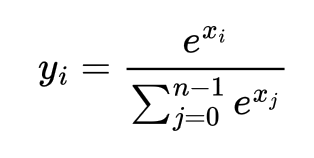
But the problem with the above formulation is that when the values xi are high as say 500, exp(xi) can cause overflow and return Infinity which will cause the softmax calculation to fail. One possible solution is to multiply both numerator and denominator by the constant exp(-max(x)). Then the updated formula is:
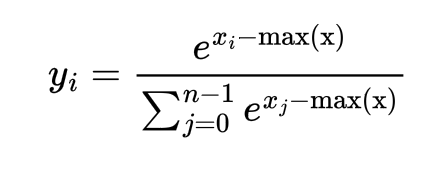
Now since we know how softmax should be computed, assuming our input tensors are 2D in shape, let’s write the following C++ function to calculate the softmax. For each row, compute the maximum value and then calculate the sum of all the exponentials (i.e. denominator) per row. Since each row can be computed in parallel, we will leverage multi-threading for this. One can use either OpenMP, or TBB (Thread Building Blocks) for this or explicit thread management. Here I am using TBB.
// File name : pytorch_c_ext.cpp

#include <Python.h>
#include <torch/extension.h>
#include <tbb/tbb.h>
#include <unistd.h>
#include <stdio.h>
#include <iostream>

namespace extension_cpp {
    void softmax(const float *inp, float *out, const unsigned long n, const unsigned long m) {
        float *max_per_row = new float[n];
        float *sum_per_row = new float[n];

        // Initialize max_per_row and sum_per_row
        tbb::parallel_for(
            tbb::blocked_range<size_t>(0, n),
            [&max_per_row, &sum_per_row](tbb::blocked_range<size_t> r) {
            for (auto i = r.begin(); i < r.end(); i++) {
                max_per_row[i] = -MAXFLOAT;
                sum_per_row[i] = 0.0;
            }
        });

        // Calculate max_per_row
        tbb::parallel_for(
            tbb::blocked_range<size_t>(0, n),
            [&max_per_row, &inp, m](tbb::blocked_range<size_t> r) {
            for (auto i = r.begin(); i < r.end(); i++) {
                for (unsigned long j = 0; j < m; j++) {
                    max_per_row[i] = std::max(max_per_row[i], inp[i*m+j]);
                }
            }
        });

        // Calculate sum_per_row
        tbb::parallel_for(
            tbb::blocked_range<size_t>(0, n),
            [&sum_per_row, &max_per_row, &inp, m](tbb::blocked_range<size_t> r) {
            for (auto i = r.begin(); i < r.end(); i++) {
                for (unsigned long j = 0; j < m; j++) {
                    sum_per_row[i] += exp(inp[i*m+j]-max_per_row[i]);
                }
            }
        });

        // Calculate softmax per row
        tbb::parallel_for(
            tbb::blocked_range<size_t>(0, n),
            [&sum_per_row, &max_per_row, &inp, &out, m](tbb::blocked_range<size_t> r) {
            for (auto i = r.begin(); i < r.end(); i++) {
                for (unsigned long j = 0; j < m; j++) {
                    out[i*m+j] = exp(inp[i*m+j]-max_per_row[i])/sum_per_row[i];
                }
            }
        });

        delete[] max_per_row;
        delete[] sum_per_row;
    }
}
But note that the above function cannot be directly used from PyTorch as the inputs to the function are floats and ints which PyTorch does not understand. For that first we need to define another C++ method that directly works with the PyTorch C++ Frontend. This method calls the above softmax method.
// File name : pytorch_c_ext.cpp

namespace extension_cpp {
    torch::Tensor softmax_cpu(const torch::Tensor &a) {
        // Input valiidation
        TORCH_CHECK(a.device().is_cpu(), "Input tensor a must be a CPU tensor");
        TORCH_CHECK(a.is_contiguous(), "Input tensor a must be contiguous");
        TORCH_CHECK(a.dtype() == torch::kFloat32, "Input tensor a must be float32");

        // Output Tensor
        torch::Tensor c = torch::empty_like(a);
        unsigned long n = a.size(0);
        unsigned long m = a.size(1);

        softmax(
            a.data_ptr<float>(),
            c.data_ptr<float>(),
            n,
            m
        );

        return c;
    }
}
Tensor.data_ptr<float>() converts a Tensor into a pointer of floats.
Next we need to export the above C++ function so that it can be called from Python. For that we will use PYBIND11. After this, our custom softmax function can be called from Python using extension_cpp.mysoftmax_cpu(Tensor).
// File name : pytorch_c_ext.cpp

namespace extension_cpp {
    PYBIND11_MODULE(extension_cpp, m) {
        m.def("mysoftmax_cpu", &softmax_cpu, "Softmax CPU Forward");
    }
}
Notice the 1st three C++ header files included above Python.h, torch/extension.h and tbb/tbb.h. These files may not be automatically included in your path. To include the file Python.h requires you to specify your Python installation’s include directory. Also it requires libpython-dev to be installed. This path can be found by running the following commands on the Python shell.
import sysconfig
print(sysconfig.get_paths()['include'])
If libpython-dev is not installed, install them by running the command apt-get install libpython-dev (in Ubuntu).
For the torch/extension.h file, this requires you to include the libtorch installation directory. If torch is automatically installed using pip install torch then it must be present in the site-packages folder (virtual environment if you are using one). The torch installation path can be found using:
import torch
print(torch.__file__)
You need to include two different include directories for the torch/extension.h file to work. For e.g. in Linux Ubuntu running Python 3.10, the following two paths are required to be included:
/opt/python/3.10/lib/python3.10/site-packages/torch/include/torch/csrc/api/include,
/opt/python/3.10/lib/python3.10/site-packages/torch/include
To include tbb/tbb.h (for using multi-threading with TBB), you need to first install tbb. In MacOS it can be installed via brew install tbb and in Linux Ubuntu, it can be installed via apt-get install libtbb-dev. To build the C++ file into binary file and make our softmax functions callable from Python, we need to run setup.py script. Below is an example of setup.py script I am using for running in Linux/Ubuntu:
# File name : setup_ubuntu.py

import torch
from setuptools import find_packages, setup

from torch.utils.cpp_extension import (
    CppExtension,
    BuildExtension,
)

setup(
    name="extension_cpp",
    version="0.0.1",
    packages=find_packages(),
    ext_modules=[
        CppExtension(
            "extension_cpp",
            ["pytorch_c_ext.cpp"],
            extra_compile_args={
                "cxx": ["-O3", "-ltbb"]
            },
            extra_link_args=["-ltbb"],
            include_dirs=[
                "/opt/python/3.10/include/python3.10", # for Python.h
                "/opt/python/3.10/lib/python3.10/site-packages/torch/include/torch/csrc/api/include", # for torch/extension.h
                "/opt/python/3.10/lib/python3.10/site-packages/torch/include", # for torch/extension.h
                "/usr/include" # for tbb/tbb.h
            ],
            library_dirs=["/usr/lib/x86_64-linux-gnu"]
        )
    ],
    install_requires=["torch"],
    description="Custom softmax implementation",
    cmdclass={"build_ext": BuildExtension}
)
Notice the extra_compile_args and extra_link_args in the above script. Also the include_dirs contains the include paths for the above mentioned header files. Note that these paths may vary depending on your OS and distribution. For e.g. in my MacOS, the setup.py script that works with the C++ file is as follows:
# File name : setup_macos.py

import torch
from setuptools import find_packages, setup

from torch.utils.cpp_extension import (
    CppExtension,
    BuildExtension,
)

setup(
    name="extension_cpp",
    version="0.0.1",
    packages=find_packages(),
    ext_modules=[
        CppExtension(
            "extension_cpp",
            ["pytorch_c_ext.cpp"],
            extra_compile_args={
                "cxx": ["-O3", "-ltbb"]
            },
            extra_link_args=["-ltbb"],
            include_dirs=[
                "/opt/homebrew/opt/python@3.13/Frameworks/Python.framework/Versions/3.13/include/python3.13", # for Python.h
                "/Users/amondal/recsys/.venv/lib/python3.13/site-packages/torch/include/torch/csrc/api/include", # for torch/extension.h
                "/Users/amondal/recsys/.venv/lib/python3.13/site-packages/torch/include", # for torch/extension.h
                "/opt/homebrew/opt/tbb/include" # for tbb/tbb.h
            ],
            library_dirs=["/opt/homebrew/opt/tbb/lib"]
        )
    ],
    install_requires=["torch"],
    description="Custom softmax implementation",
    cmdclass={"build_ext": BuildExtension}
)
To build the C++ files in Ubuntu using setup.py, we can run the following command to build wheel files (similar command for MacOS too): python3 setup_ubuntu.py bdist_wheel
This will create the wheel file with the package name and version inside the dist folder. To install the wheel file run pip install command as follows: python3 -m pip install dist/*.whl
This will install the python package in the site-packages folder. Once installed, you can use it in your Python code by importing extension_cpp. Following example shows how to use the above custom softmax operator.
# File name : mytest.py

import torch
import extension_cpp
import time

# Create random tensor
a_cpu = torch.randn(1000, 1024, dtype=torch.float32, requires_grad=False, device='cpu')

# Check results using in-built softmax in PyTorch
start = time.time()*1000
b1 = torch.nn.functional.softmax(a_cpu, dim=-1, dtype=torch.float32)
end = time.time()*1000
print("Torch CPU Forward Pass Duration = ", end-start)
print("Torch CPU Forward Pass Output\n", b1)
print()

# Check results using custom softmax
start = time.time()*1000
b2 = extension_cpp.mysoftmax_cpu(a_cpu)
end = time.time()*1000
print("Custom CPU Forward Pass Duration = ", end-start)
print("Custom CPU Forward Pass Output\n", b2)

assert torch.allclose(b1, b2), "Results are not same"
You can compare the outputs and the run-times with the built-in softmax vs the custom softmax operator. On my MacOS M4 ARM chip, I get the following performance numbers with a random matrix of shape 1000x1024.
Torch  CPU Forward Pass Duration =  0.6728515625
Custom CPU Forward Pass Duration =  1.5710449218
On an Intel server running Ubuntu 22.04, I get the following performance numbers.
Torch  CPU Forward Pass Duration =  1.87451171875
Custom CPU Forward Pass Duration =  6.12963867187
Usually the custom softmax operator is slower than the in-built one since the C++ code is not very optimized. You can further improve the performace of the custom C++ code by using SIMD (available on Intel CPU machines). The in-built softmax can perform exceptionally well for some special matrix dimensions and structure such as large number of columns than rows or number of rows and columns with powers of 2 and so on. The custom implemention performs better when number of rows are far greater than the number of columns because the multi-threading is applied along rows.
So far we have only implemented a custom softmax version for the CPU, let’s build the same for GPU using CUDA. Define a CUDA file with the below 2 functions as follows:
// File name : mysoftmax.cu

#include <cuda.h>
#include <cuda_runtime.h>
#include <stdio.h>
#include <unistd.h>
#include <iostream>

#define BLOCK_WIDTH_PER_DIM 32

// Custom atomicMax operation for floating point numbers
__device__ __forceinline__ float atomicMaxF32(float *address, float val) {
    int ret = __float_as_int(*address);
    while(val > __int_as_float(ret))
    {
        int old = ret;
        if((ret = atomicCAS((int *)address, old, __float_as_int(val))) == old)
            break;
    }
    return __int_as_float(ret);
}

__global__
void softmax_cuda(const float *inp, float *out, const unsigned long n, const unsigned long m) {
    unsigned long row = blockIdx.y*blockDim.y + threadIdx.y;
    unsigned long p = (m+BLOCK_WIDTH_PER_DIM-1)/BLOCK_WIDTH_PER_DIM;

    __shared__ float max_per_row[BLOCK_WIDTH_PER_DIM];
    __shared__ float sum_per_row[BLOCK_WIDTH_PER_DIM];

    if (row < n) {
        if (threadIdx.x == 0) {
            max_per_row[threadIdx.y] = -MAXFLOAT;
            sum_per_row[threadIdx.y] = 0.0f;
        }
        __syncthreads();

        for (unsigned long j = threadIdx.x; j < p*BLOCK_WIDTH_PER_DIM; j += BLOCK_WIDTH_PER_DIM) {
            if (j < m) {
                atomicMaxF32(&max_per_row[threadIdx.y], inp[row*m + j]);
            }
        }

        __syncthreads();

        for (unsigned long j = threadIdx.x; j < p*BLOCK_WIDTH_PER_DIM; j += BLOCK_WIDTH_PER_DIM) {
            if (j < m) {
                atomicAdd(&sum_per_row[threadIdx.y], exp(inp[row*m + j]-max_per_row[threadIdx.y]));
            }
        }

        __syncthreads();

        for (unsigned long j = threadIdx.x; j < p*BLOCK_WIDTH_PER_DIM; j += BLOCK_WIDTH_PER_DIM) {
            if (j < m) {
                out[row*m + j] = exp(inp[row*m + j]-max_per_row[threadIdx.y])/sum_per_row[threadIdx.y];
            }
        }
    }
}

void softmax_cuda_launcher(const float *inp, float *out, const unsigned long n, const unsigned long m) {
    dim3 bd(BLOCK_WIDTH_PER_DIM, BLOCK_WIDTH_PER_DIM, 1);
    dim3 gd(1, (n+BLOCK_WIDTH_PER_DIM-1)/BLOCK_WIDTH_PER_DIM, 1);

    softmax_cuda<<<gd, bd>>>(inp, out, n, m);
    cudaDeviceSynchronize();

    cudaError_t err = cudaGetLastError();
    if (err != cudaSuccess) {
        fprintf(stderr, "CUDA error: %s\n", cudaGetErrorString(err));
    }
}
We launch a CUDA kernel with a 2D grid of threads and blocks where each block has 32 threads along x-dim and 32 threads along the y-dim (because maximum number of threads per block can be 1024). We launch only 1 block along the x-dim i.e. columns because we need to compute the maximum value and the summation along columns and having multiple blocks will require block synchronization if we are using shared memory to store the maximum and summation values. In the event we do not use shared memory but global memory for storing the maximum and summations, we can launch multiple blocks along the x-dim too.
Since a block has 32 threads along x-dim, thus for m columns in the input matrix, each thread is responsbile for ceil(m/32) number of elements. The maximum and summation values are computed in shared memory to avoid global memory latencies.
Notice that we are defining atomicMaxF32 because in CUDA currently there is no atomicMax function for float32 data types and we need to explicitly implement it using atomicCAS.
We update our C++ file to include the function declaration for our function softmax_cuda_launcher and as well define the torch C++ frontend for interacting with the CUDA launcher. Another modification needed is to update the PYBIND11 module to include the CUDA version of the softmax.
// File name : pytorch_c_ext.cpp

void softmax_cuda_launcher(const float *inp, float *out, const unsigned long n, const unsigned long m);

namespace extension_cpp {
    torch::Tensor softmax_gpu(const torch::Tensor &a) {
        // Input valiidation
        TORCH_CHECK(a.device().is_cuda(), "Input tensor a must be a CUDA tensor");
        TORCH_CHECK(a.is_contiguous(), "Input tensor a must be contiguous");
        TORCH_CHECK(a.dtype() == torch::kFloat32, "Input tensor a must be float32");

        torch::Tensor c = torch::empty_like(a);
        unsigned long n = a.size(0);
        unsigned long m = a.size(1);

        softmax_cuda_launcher(
            a.data_ptr<float>(),
            c.data_ptr<float>(),
            n,
            m
        );

        return c;
    }

    PYBIND11_MODULE(extension_cpp, m) {
        m.def("mysoftmax_cpu", &softmax_cpu, "Softmax CPU Forward");
        m.def("mysoftmax_gpu", &softmax_gpu, "Softmax GPU Forward");
    }
}
Next we also need to modify the setup.py script to include CUDA specific configurations. The following is the updated setup_ubuntu.py script from above.
# File name : setup_ubuntu.py

import torch
from setuptools import find_packages, setup

from torch.utils.cpp_extension import (
    CppExtension,
    CUDAExtension,
    BuildExtension,
)

setup(
    name="extension_cpp",
    version="0.0.1",
    packages=find_packages(),
    ext_modules=[
        CUDAExtension(
            "extension_cpp",
            ["pytorch_c_ext.cpp", "mysoftmax.cu"],
            extra_compile_args={
                "nvcc": ["-arch=sm_89", "-Xcompiler=-O3"],
                "cxx": ["-O3", "-ltbb"]
            },
            extra_link_args=["-ltbb"],
            include_dirs=[
                "/opt/python/3.10/include/python3.10",
                "/opt/python/3.10/lib/python3.10/site-packages/torch/include/torch/csrc/api/include",
                "/opt/python/3.10/lib/python3.10/site-packages/torch/include",
                "/usr/include"
            ],
            library_dirs=["/usr/lib/x86_64-linux-gnu"]
        )
    ],
    install_requires=["torch"],
    description="Custom C++ and CUDA softmax extension",
    cmdclass={"build_ext": BuildExtension}
)
Notice the nvcc parameters in extra_compile_args. The flag -arch=sm_89 is required when the CUDA version and the NVIDIA firmware version are not compatible and we need to compile our CUDA code using hardware specific architecture. The current GPU architecture for my Ubuntu 22.04 server is 8.9 and thus we need to use the flag -arch=sm_89. To get the correct hardware architecture for the GPU use the command nvidia-smi.
To build the wheel and install it, follow the same instructions mentioned above.
To test the performance and output of the GPU version of the custom softmax implementation, we update the mytest.py script as follows:
# File name : mytest.py

import torch
import extension_cpp
import time

# Create random tensor
a_cpu = torch.randn(1000, 1024, dtype=torch.float32, requires_grad=False, device='cpu')

# Check results using in-built softmax in PyTorch
start = time.time()*1000
b1 = torch.nn.functional.softmax(a_cpu, dim=-1, dtype=torch.float32)
end = time.time()*1000
print("Torch CPU Forward Pass Duration = ", end-start)
print("Torch CPU Forward Pass Output\n", b1)
print()

# Check results using custom softmax
start = time.time()*1000
b2 = extension_cpp.mysoftmax_cpu(a_cpu)
end = time.time()*1000
print("Custom CPU Forward Pass Duration = ", end-start)
print("Custom CPU Forward Pass Output\n", b2)

# Copy the tensor to GPU
a_gpu = a_cpu.to(device='cuda:0')

# Check results using custom softmax on GPU
start = time.time()*1000
b3 = extension_cpp.mysoftmax_gpu(a_cpu)
end = time.time()*1000
print("Custom GPU Forward Pass Duration = ", end-start)
print("Custom GPU Forward Pass Output\n", b3)

assert torch.allclose(b1, b2), "b1 and b2 are not same"
assert torch.allclose(b1, b3), "b1 and b3 are not same"
The performance numbers looks like the one below:
Torch  CPU Forward Pass Duration =  1.87451171875
Custom CPU Forward Pass Duration =  6.12963867187
Custom GPU Forward Pass Duration =  0.44140625
Clearly the GPU version of our softmax outperforms the CPU versions for both in-built and custom CPU implementations.
So far what we have implemented are the custom versions for the softmax function for both CPU and GPU. But this will not be sufficient to use the functions in an actual deep learning model because the implementations above are for forward pass only and to train a neural network we also need the backward pass because the loss functions are calculated on top of the softmax outputs and thus the gradient needs to flow through it.
Implementing a custom backward pass for the softmax is not difficult if you understand two things:
1. How the derivatives of the softmax outputs looks like w.r.t. the inputs.
2. How gradient flows backwards in PyTorch.
In short the way autograd works is as follows:
During the forward pass through any layer or function H(k) with inputs H(k)_I and outputs H(k)_O, one can cache either the inputs or outputs or both for re-using during the backward pass. During backward pass through layer H(k), we need to compute the derivative of the loss L w.r.t. the inputs H(k)_I. But note that the input to the next layer of H(k) i.e. H(k+1) is the output H(k)_O i.e. H(k+1)_I = H(k)_O

Thus to compute the derivative dL/dH(k)_I we only need to compute the derivatives dH(k)_O/dH(k)_I because the other derivative dL/dH(k+1)_I is already computed since we are computing the gradients backwards from layer H(k+1) to layer H(k) and so on.
In Pytorch, while writing the backward pass for an operator, it is assumed that the derivative dL/dH(k+1)_I is available as input and is called the grad in the inputs. The only task is to compute dH(k)_O/dH(k)_I.
Coming to the softmax operator, each output yi is expressed in terms of [x0, x1, ..., xn-1] as shown below:
The derivatives dyi/dxj are computed as follows:
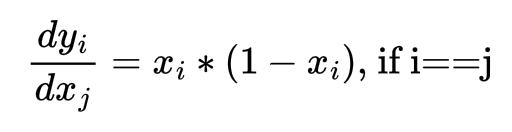
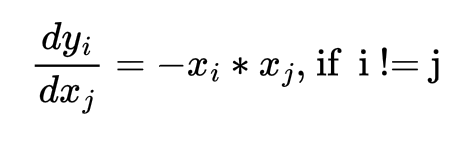
Once we obtain the derivatives, computing the derivative of loss w.r.t. xj works as follows:

Note that the above RHS expression can be written as a dot product between 2 vectors as follows:

The C++ code for computing the gradient of the Loss w.r.t. softmax inputs assuming the gradient of loss w.r.t. to next layer inputs are available as another tensor grad is as follows. The tensor fwd is the output tensor from softmax forward pass because we saw that the gradient of softmax output w.r.t. softmax input can be expressed solely using softmax output terms:
// File name : pytorch_c_ext.cpp

namespace extension_cpp {
    void softmax_grad(const float *grad, const float *fwd, float *out, const unsigned long n, const unsigned long m) {
        tbb::parallel_for(
            tbb::blocked_range<size_t>(0, n),
            [&fwd, &out, &grad, m](tbb::blocked_range<size_t> r) {
                for (auto i = r.begin(); i < r.end(); i++) {
                    for (unsigned int j = 0; j < m; j++) {
                        float s = 0.0;
                        for (unsigned int k = 0; k < m; k++) {
                            if (j == k) s += grad[i*m + k]*fwd[i*m + j]*(1.0 - fwd[i*m + j]);
                            else s += -grad[i*m + k]*fwd[i*m + k]*fwd[i*m + j];
                        }
                        out[i*m + j] = s;
                    }
                }
            }
        );
    }

    torch::Tensor softmax_cpu_grad(const torch::Tensor &grad, const torch::Tensor &fwd_out) {
        TORCH_CHECK(fwd_out.device().is_cpu(), "Input tensor fwd_out must be a CPU tensor");
        TORCH_CHECK(grad.device().is_cpu(), "Input tensor grad must be a CPU tensor");

        TORCH_CHECK(fwd_out.is_contiguous(), "Input tensor fwd_out must be contiguous");
        TORCH_CHECK(grad.is_contiguous(), "Input tensor grad must be contiguous");

        TORCH_CHECK(fwd_out.dtype() == torch::kFloat32, "Input tensor fwd_out must be float32");
        TORCH_CHECK(grad.dtype() == torch::kFloat32, "Input tensor grad must be float32");

        TORCH_CHECK(grad.size(0) == fwd_out.size(0) && grad.size(1) == fwd_out.size(1), "Mismatched shapes");

        torch::Tensor c = torch::empty_like(grad);
        unsigned long n = grad.size(0);
        unsigned long m = grad.size(1);

        softmax_grad(
            grad.data_ptr<float>(),
            fwd_out.data_ptr<float>(),
            c.data_ptr<float>(),
            n,
            m
        );

        return c;
    }

    PYBIND11_MODULE(extension_cpp, m) {
        m.def("mysoftmax_cpu", &softmax_cpu, "Softmax CPU Forward");
        m.def("mysoftmax_gpu", &softmax_gpu, "Softmax GPU Forward");
        m.def("mysoftmax_cpu_grad", &softmax_cpu_grad, "Softmax CPU Backward");
    }
}
We do not need to modify the setup.py script but we can update the version number and do a pip install using the latest version of the package. Similar to the backward pass operation for CPU, we can also write similar backward pass operation for the GPU in the file mysoftmax.cu as follows:
// File name : mysoftmax.cu

__global__
void softmax_cuda_grad(const float *grad, const float *fwd, float *out, const unsigned long n, const unsigned long m) {
    unsigned long row = blockIdx.y*blockDim.y + threadIdx.y;
    unsigned long col = blockIdx.x*blockDim.x + threadIdx.x;

    if (row < n && col < m) {
        float p = fwd[row*m + col];
        float s = 0.0f;

        for (unsigned long j = 0; j < m; j++) {
            if (j == col) s += grad[row*m + j]*p*(1.0-p);
            else s += -grad[row*m + j]*fwd[row*m + j]*p;
        }

        out[row*m + col] = s;
    }
}

void softmax_cuda_grad_launcher(const float *grad, const float *fwd, float *out, const unsigned long n, const unsigned long m) {
    dim3 bd(BLOCK_WIDTH_PER_DIM, BLOCK_WIDTH_PER_DIM, 1);
    dim3 gd((m+BLOCK_WIDTH_PER_DIM-1)/BLOCK_WIDTH_PER_DIM, (n+BLOCK_WIDTH_PER_DIM-1)/BLOCK_WIDTH_PER_DIM, 1);

    softmax_cuda_grad<<<gd, bd>>>(grad, fwd, out, n, m);
    cudaDeviceSynchronize();

    cudaError_t err = cudaGetLastError();
    if (err != cudaSuccess) {
        fprintf(stderr, "CUDA error: %s\n", cudaGetErrorString(err));
    }
}
Nothing very fancy at this moment, but definitely one can optimze the CUDA kernel above by using shared memories or thread coarsening.
This also requires updating our C++ file to include the declaration of the function softmax_cuda_grad_launcher and defining a torch C++ frontend and the corresponding PYBIND11 module as follows:
// File name : pytorch_c_ext.cpp

void softmax_cuda_launcher(const float *inp, float *out, const unsigned long n, const unsigned long m);
void softmax_cuda_grad_launcher(const float *grad, const float *fwd, float *out, const unsigned long n, const unsigned long m);

namespace extension_cpp {
    torch::Tensor softmax_gpu_grad(const torch::Tensor &grad, const torch::Tensor &fwd_out) {
        TORCH_CHECK(fwd_out.device().is_cuda(), "Input tensor fwd_out must be a CUDA tensor");
        TORCH_CHECK(grad.device().is_cuda(), "Input tensor grad must be a CUDA tensor");

        TORCH_CHECK(fwd_out.is_contiguous(), "Input tensor fwd_out must be contiguous");
        TORCH_CHECK(grad.is_contiguous(), "Input tensor grad must be contiguous");

        TORCH_CHECK(fwd_out.dtype() == torch::kFloat32, "Input tensor fwd_out must be float32");
        TORCH_CHECK(grad.dtype() == torch::kFloat32, "Input tensor grad must be float32");

        TORCH_CHECK(grad.size(0) == fwd_out.size(0) && grad.size(1) == fwd_out.size(1), "Mismatched shapes");

        torch::Tensor c = torch::empty_like(grad);
        unsigned long n = grad.size(0);
        unsigned long m = grad.size(1);

        softmax_cuda_grad_launcher(
            grad.data_ptr<float>(),
            fwd_out.data_ptr<float>(),
            c.data_ptr<float>(),
            n,
            m
        );

        return c;
    }

    PYBIND11_MODULE(extension_cpp, m) {
        m.def("mysoftmax_cpu", &softmax_cpu, "Softmax CPU Forward");
        m.def("mysoftmax_gpu", &softmax_gpu, "Softmax GPU Forward");
        m.def("mysoftmax_cpu_grad", &softmax_cpu_grad, "Softmax CPU Backward");
        m.def("mysoftmax_gpu_grad", &softmax_gpu_grad, "Softmax GPU Backward");
    }
}
Once we define the C++ and CUDA functions for forward and backward passes and build the python package, we need to wrap the forward and backward passes with torch.autograd.Function and torch.nn.Module as follows:
# File name : mytest.py

import torch
import extension_cpp
import time

# class definition for custom CPU softmax implementation
class MySoftmaxFunctionCPU(torch.autograd.Function):
    @staticmethod
    def forward(ctx, input:torch.Tensor):
        output:torch.Tensor = extension_cpp.mysoftmax_cpu(input)
        # save the output as the output will be used during backward pass as input
        ctx.save_for_backward(output)
        return output

    @staticmethod
    def backward(ctx, grad:torch.Tensor):
        output = extension_cpp.mysoftmax_cpu_grad(grad.contiguous(), *ctx.saved_tensors)
        return output

class MySoftmaxCPU(torch.nn.Module):
    def __init__(self):
        super(MySoftmaxCPU, self).__init__()

    def forward(self, input):
        return MySoftmaxFunctionCPU.apply(input)

# class definition for custom GPU softmax implementation
class MySoftmaxFunctionGPU(torch.autograd.Function):
    @staticmethod
    def forward(ctx, input:torch.Tensor):
        output:torch.Tensor = extension_cpp.mysoftmax_gpu(input)
        # save the output as the output will be used during backward pass as input
        ctx.save_for_backward(output)
        return output

    @staticmethod
    def backward(ctx, grad:torch.Tensor):
        output = extension_cpp.mysoftmax_gpu_grad(grad.contiguous(), *ctx.saved_tensors)
        return output

class MySoftmaxGPU(torch.nn.Module):
    def __init__(self):
        super(MySoftmaxGPU, self).__init__()

    def forward(self, input):
        return MySoftmaxFunctionGPU.apply(input)
Then we can run and test all the 4 different custom functions as follows. For backward pass we are assuming a simple loss function which is the sum of the squares of the softmax outputs. Using just the sum is not a good idea because the loss would be a constant and the gradients would be 0. In most practical applications we generally use the categorical crossentropy loss on top of softmax:
# File name : mytest.py

a_cpu = torch.randn(1000, 1024, dtype=torch.float32, requires_grad=True, device='cpu')

start = time.time()*1000
b1 = torch.nn.functional.softmax(a_cpu, dim=-1, dtype=torch.float32)
end = time.time()*1000
print("Torch CPU Forward Pass Duration = ", end-start)
print("Torch CPU Forward Pass Output\n", b1)
print()

start = time.time()*1000
(b1**2).sum().backward()
end = time.time()*1000
print("Torch CPU Backward Pass Duration = ", end-start)
print("Torch CPU Backward Pass Output\n", a_cpu.grad)
print()

b_cpu = a_cpu.clone()
b_cpu.retain_grad()

start = time.time()*1000
h = MySoftmaxCPU()
b2 = h(b_cpu)
end = time.time()*1000
print("Custom CPU Forward Pass Duration = ", end-start)
print("Custom CPU Forward Pass Output\n", b2)
print()

start = time.time()*1000
(b2**2).sum().backward()
end = time.time()*1000
print("Custom CPU Backward Pass Duration = ", end-start)
print("Custom CPU Backward Pass Output\n", b_cpu.grad)
print()

a_gpu = a_cpu.to(device='cuda:0')
a_gpu.retain_grad()

start = time.time()*1000
h = MySoftmaxGPU()
b3 = h(a_gpu)
end = time.time()*1000
print("Custom GPU Forward Pass Duration = ", end-start)
print("Custom GPU Forward Pass Output\n", b3)
print()

start = time.time()*1000
(b3**2).sum().backward()
end = time.time()*1000
print("Custom GPU Backward Pass Duration = ", end-start)
print("Custom GPU Backward Pass Output\n", a_gpu.grad)
print()
The performance numbers are as follows:
Torch  CPU Forward  Pass Duration =  1.87451171875
Torch  CPU Backward Pass Duration =  101.746826171875
Custom CPU Forward  Pass Duration =  6.12963867187
Custom CPU Backward Pass Duration =  86.082763671875
Custom GPU Forward  Pass Duration =  0.44140625
Custom GPU Backward Pass Duration =  57.375244140625
Interestingly the backward pass performance with custom CPU implementation is faster than the in-built torch backward pass implementation. The GPU implementations are faster for both forward and backward passes.
Implementing custom operators is useful for situations where expressing some operation as a composition of available operations can be inefficient and writing your own custom fused kernels or composition is much faster such as fused multiply and add.